Party-scene lead from one photo
Burning Bridges AI photo animation
Burning Bridges AI replaces the party lead in a fixed 10-second, 16:9 clip with one adult photo. Wan 2.2 Animate Replace keeps the room and timing. Other people stay in the reference. There is no second photo, and the download does not include the song.
What does Burning Bridges AI do?
Last updated
Burning Bridges AI animates one adult photo into the 10-second, 16:9 party reference.
Burning Bridges AI replaces the person in the black cap. Other people in the room stay in the reference.
One photo uses Wan 2.2 Animate Replace at 480p or 720p. The file does not include the song.
Why follow this reference?
Party shots are crowded, so a text prompt usually invents a new room. Burning Bridges AI keeps the loaded room and only changes the lead.
Your photo should show one adult with a visible face and outfit. The model uses that photo for the person leading the scene, not for everyone behind them.
Choose 720p when the cap, hair, and jacket need to stay sharper. Burning Bridges AI uses 480p for a cheaper first look.
Motion reference
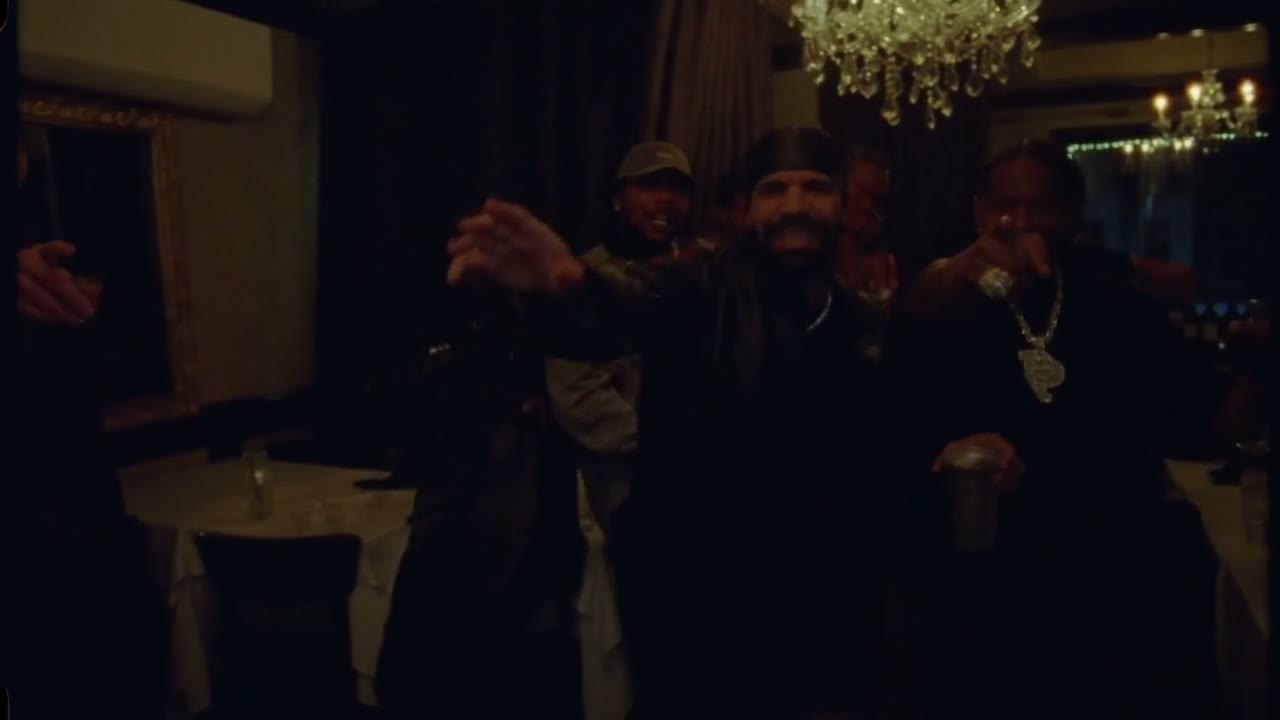
This Burning Bridges AI reference is the clip the workbench follows. It is not your generated result, and it does not include the song.
What does Burning Bridges AI keep?
The lead is the only replacement
The slot is labeled Lead. Burning Bridges AI leaves background guests in the reference instead of treating them as uploads.
Ten seconds, widescreen
The run stays 10 seconds at 16:9, matching the party reference rather than a vertical social crop.
Resolution is the only quality switch
480p and 720p change the credit cost. They do not change who is replaced or how long the clip is.
No soundtrack upload
You cannot attach the song. Burning Bridges AI returns a new motion clip for the person in your photo.
How do I run Burning Bridges AI?
- 1. Add one lead photo. Face and outfit need to be clear. Burning Bridges AI needs the eyes readable, so avoid sunglasses when you can.
- 2. Play the party reference. Confirm you want that room and camera before spending credits.
- 3. Pick 480p or 720p. Start at 480p if you are testing the likeness. Move to 720p when the face holds.
- 4. Review the crowd edges. Look for the lead blending into nearby people, then regenerate with a cleaner portrait if that happens.
Where does this photo animation fit?
A portrait in a crowded room
Use this when the photo was shot simply and Burning Bridges AI should place that person in the existing party setup.
A wardrobe test
A clear jacket or shirt in the still gives the motion pass something stable to follow.
A short widescreen cut
Ten seconds is the full Burning Bridges AI cut, not a full scene edit.
How does this compare?
Choose Burning Bridges AI when the motion should stay on this loaded reference.
| Workflow | What you supply | What stays fixed | Audio |
|---|---|---|---|
| Burning Bridges AI | One photo of the party lead. Other people in the room stay in the reference. | The reference loaded on this page | Not included |
| Photo to Video | One photo and a motion description | No reference clip | Depends on the model you pick |
| Replace Character | Your photo and a source video you upload | The motion in your video | Set on Replace Character, not by this fixed reference |
| Wan 2.2 Animate Replace | A character image and a driving video | The driving video you choose | Set on that page, not by this fixed reference |
Which settings should I use?
| Choice | Model | Credits |
|---|---|---|
| One photo · 10s · 16:9 · 480p | Wan 2.2 Animate Replace | 215 |
| One photo · 10s · 16:9 · 720p | Wan 2.2 Animate Replace | 430 |
Burning Bridges AI charges the credit totals in this table.
One photo at 480p uses 215 credits. One photo at 720p uses 430 credits.
Charged in credits. See the credit table on this page. Two-photo runs bill the reference length plus the new clip. Opening the workbench does not charge credits.
Use a JPG, PNG, or WebP photo up to 10MB.
Animate Photo AI is not the model provider. One photo uses Wan 2.2 Animate Replace.
Common questions
Can I replace the whole crowd?
No. Burning Bridges AI replaces the lead in the black cap only. Everyone else remains part of the loaded party reference and cannot be uploaded as separate photos. The room, camera, and ten-second timing stay with that reference. You cannot assign the guests their own stills.
Does it include the song?
No. Burning Bridges AI follows the party motion and does not put a released track in the file. This page has no soundtrack upload. The room, camera, and ten-second timing stay with the loaded reference. Check the lead against nearby guests before you download.
Why is there no second photo?
The reference has one designated lead. A partner slot would imply a second replacement this clip is not set up to map.
Which model is used?
Wan 2.2 Animate Replace. Burning Bridges AI does not offer a model picker on this page.
What if the face flickers?
Use a sharper photo, keep one person in frame, and try 720p after the 480p test looks close.
Can I bring my own party video?
Not here. Upload your own source on Replace Character if the motion reference should be a file you provide.
Can I use the clip commercially?
You keep the rights to the photos you upload. The User Content section at /terms#user-content says those rights stay with you, and that you grant Animate Photo AI a license only to provide the service. This page does not grant rights to a song, an official video, or another person's likeness.
Related tools
Start with your photo
Run Burning Bridges AI from the workbench above. Opening it does not charge credits.
Back to the workbench