Red-stage dance from one photo
Cheba Man AI photo animation
Cheba Man AI places one full-body adult photo on a fixed 15-second, 9:16 red-stage dance. Wan 2.2 Animate Replace follows that dance instead of inventing a new camera move. There is no second dancer and no soundtrack. This page is not an official artist product.
What does Cheba Man AI do?
Last updated
Cheba Man AI animates one adult photo on the 15-second, 9:16 stage reference.
Cheba Man AI replaces the dancer in the striped shirt. Wan 2.2 Animate Replace runs at 480p or 720p.
The preview is the motion reference. The download does not promise the reference audio or an official likeness.
Why follow this reference?
Stage dances fail in a normal image-to-video prompt because the model invents steps. Cheba Man AI already has those steps in the loaded clip.
A full-body photo works better than a headshot. The dance uses the torso, arms, and stance, so those need to be visible in the still.
The red stage, the crop, and the 15-second timing stay fixed. Cheba Man AI only changes who is dancing and whether the file is 480p or 720p.
Motion reference
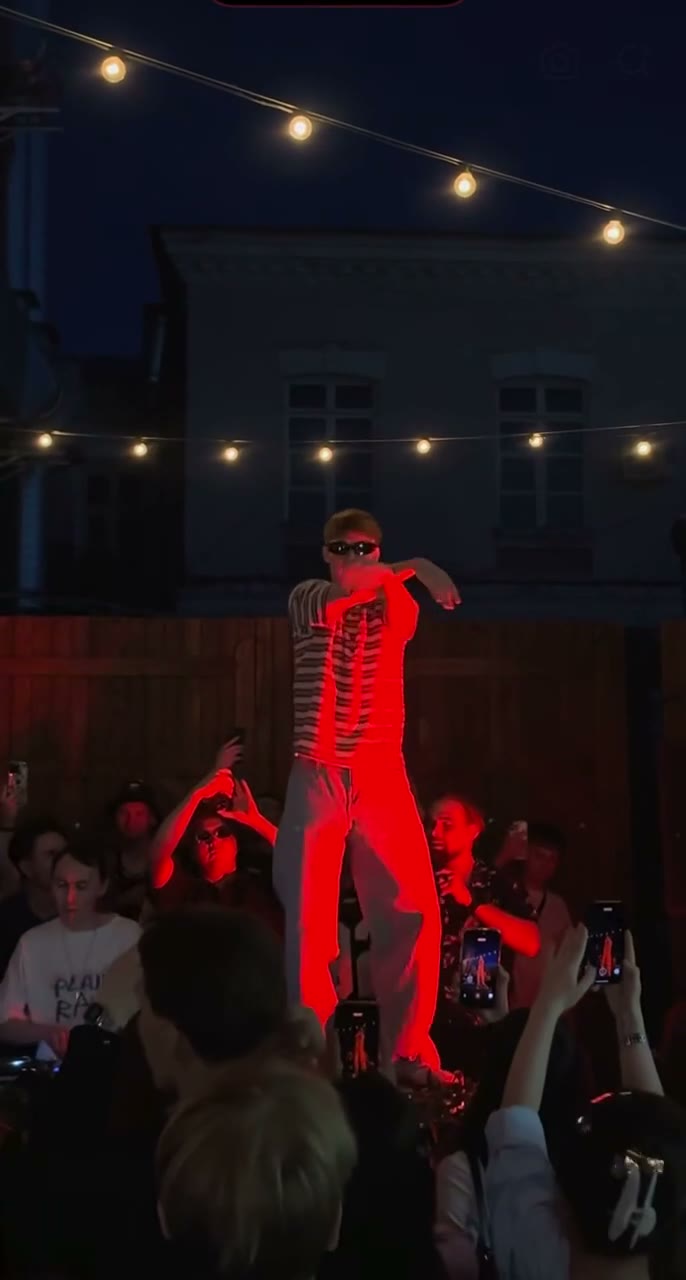
This Cheba Man AI reference is the clip the workbench follows. It is not your generated result, and it does not include the song.
What does Cheba Man AI keep?
Full-body stills hold up better
The slot asks for one adult and prefers the whole body, because the stage routine is not a face-only move.
Vertical 15-second output
The file stays 9:16 and 15 seconds. Cheba Man AI does not add a separate crop step.
Two resolutions, one model
Wan 2.2 Animate Replace is locked in. 480p is the cheaper test. Cheba Man AI uses 720p to keep more of the shirt and stage edge.
The preview is not your result
The video in the form is the reference everyone follows. Your generated file appears after the run.
How do I run Cheba Man AI?
- 1. Upload a full-body photo. One adult, standing if possible, with the outfit easy to see.
- 2. Watch the stage reference. The striped-shirt dancer is the person Cheba Man AI replaces.
- 3. Select 480p or 720p. Use 480p to judge the motion, then 720p if the identity is close enough.
- 4. Inspect the arms and shirt. Fast arm lines and stripes are the first places a still can smear. Regenerate from a sharper photo if they do.
Where does this photo animation fit?
A dance portrait
A clean full-body still is the right input when Cheba Man AI should put that person on the red stage.
A costume check
Distinct clothing gives the replacement a shape the stage lighting can follow.
A vertical social cut
Fifteen seconds at 9:16 is a single Cheba Man AI post, not a multi-scene edit.
How does this compare?
Choose Cheba Man AI when the motion should stay on this loaded reference.
| Workflow | What you supply | What stays fixed | Audio |
|---|---|---|---|
| Cheba Man AI | One full-body photo. There is no second dancer. | The reference loaded on this page | Not included |
| Photo to Video | One photo and a motion description | No reference clip | Depends on the model you pick |
| Replace Character | Your photo and a source video you upload | The motion in your video | Set on Replace Character, not by this fixed reference |
| Wan 2.2 Animate Replace | A character image and a driving video | The driving video you choose | Set on that page, not by this fixed reference |
Which settings should I use?
| Choice | Model | Credits |
|---|---|---|
| One photo · 15s · 9:16 · 480p | Wan 2.2 Animate Replace | 315 |
| One photo · 15s · 9:16 · 720p | Wan 2.2 Animate Replace | 635 |
Cheba Man AI charges the credit totals in this table.
One photo at 480p uses 315 credits. One photo at 720p uses 635 credits.
Charged in credits. See the credit table on this page. Two-photo runs bill the reference length plus the new clip. Opening the workbench does not charge credits.
Use a JPG, PNG, or WebP photo up to 10MB.
Animate Photo AI is not the model provider. One photo uses Wan 2.2 Animate Replace.
Common questions
Is this an official artist product?
No. Cheba Man AI follows a loaded stage reference. It is not affiliated with a performer, and it does not sell or deliver an official release. The name only identifies the 15-second red-stage dance already loaded on this page.
Can I add a second dancer?
No. This reference has one dancer slot. Use a two-slot page such as Gas Station Dance AI when you need two replacements.
Does the clip include the song?
No. Cheba Man AI follows the dance and does not deliver the track. The video shown before you generate is the motion reference, not your finished file. There is no soundtrack upload, and mouth movement is not timed to a released song.
Why does the form show a video before I generate?
That video is the motion reference. It is not a sample of your photo.
What model runs?
Wan 2.2 Animate Replace, at either 480p or 720p.
What if the body looks wrong?
Start again from a full-body photo with the limbs visible. Headshots have less information for a dance.
Can I use the clip commercially?
You keep the rights to the photos you upload. The User Content section at /terms#user-content says those rights stay with you, and that you grant Animate Photo AI a license only to provide the service. This page does not grant rights to a song, an official video, or another person's likeness.
Related tools
Start with your photo
Run Cheba Man AI from the workbench above. Opening it does not charge credits.
Back to the workbench