Pier clip from your photos
Raindance AI photo animation
Raindance AI places one or two photos on a fixed 15-second, 16:9 pier clip. One photo replaces the singer in the red dress with Wan 2.2 Animate Replace. A second photo replaces the person on the sand with Seedance 2.5. The download follows that motion and does not include the song.
What does Raindance AI do?
Last updated
Raindance AI animates a still photo so the person follows the 15-second, 16:9 pier clip already loaded in the workbench.
Raindance AI uses Wan 2.2 Animate Replace for the singer in the red dress. A second photo uses Seedance 2.5 for the person on the sand.
The finished file is a new clip. It does not include the song, and it is not the Raindance Film Festival.
Why follow this reference?
A normal photo-to-video prompt can make a person turn or walk, but it invents a new camera move. Raindance AI starts from the pier clip, so the blink, sway, and framing stay tied to that reference.
Use it when you already like the waterfront setup and only want to change who is standing there. The first photo replaces the woman in the red dress. A second photo replaces the man sitting on the sand.
Upload photos you have rights to use. Raindance AI does not copy an official music video, and mouth movement is not timed to a released track.
Motion reference
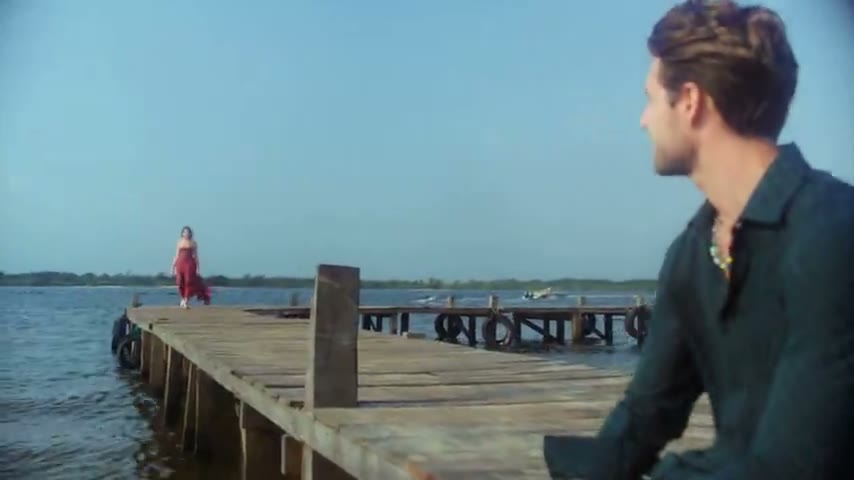
This Raindance AI reference is the clip the workbench follows. It is not your generated result, and it does not include the song.
What does Raindance AI keep?
One photo keeps the pier motion
Wan 2.2 Animate Replace puts the uploaded person into the reference and follows the existing movement. The location and camera path stay with the clip.
A second photo recasts the partner
Seedance 2.5 uses both photos at once. Each photo supplies that person’s face, hair, build, and clothing instead of pasting a face onto the original body.
Length and frame stay fixed
Raindance AI stays 15 seconds at 16:9. You choose 480p or 720p. There is no model menu and no soundtrack upload.
The song stays out of the file
The reference shows the motion. Raindance AI returns a silent performance of that motion, not a released recording.
How do I run Raindance AI?
- 1. Add the singer photo. Use a clear photo of one adult. The face, hair, and outfit should be visible.
- 2. Add a partner only if you want both people. Leave the second slot empty for a solo. Add it when someone should replace the person on the sand.
- 3. Choose 480p or 720p. 480p spends fewer credits. 720p keeps more detail in hair and clothing.
- 4. Generate and check the faces. Raindance AI should keep the two people distinct along the waterline before you download.
Where does this photo animation fit?
A couple on the waterfront
Use two portraits when Raindance AI should place both people in the pier setup. Keep each photo to one person so the identities do not blend.
A solo portrait
One photo is enough when you only need the singer replaced. The partner slot can stay empty.
A still from a trip
A sharp travel portrait can take the pier motion. Raindance AI does not need a new clip filmed on location.
How does this compare?
Choose Raindance AI when the motion should stay on this loaded reference.
| Workflow | What you supply | What stays fixed | Audio |
|---|---|---|---|
| Raindance AI | One or two photos. The singer in the red dress is required. The person on the sand is optional. | The reference loaded on this page | Not included |
| Photo to Video | One photo and a motion description | No reference clip | Depends on the model you pick |
| Replace Character | Your photo and a source video you upload | The motion in your video | Set on Replace Character, not by this fixed reference |
| Wan 2.2 Animate Replace | A character image and a driving video | The driving video you choose | Set on that page, not by this fixed reference |
Which settings should I use?
| Choice | Model | Credits |
|---|---|---|
| One photo · 15s · 16:9 · 480p | Wan 2.2 Animate Replace | 315 |
| One photo · 15s · 16:9 · 720p | Wan 2.2 Animate Replace | 635 |
| Two photos · 15s · 16:9 · 480p | Seedance 2.5 | 1,690 |
| Two photos · 15s · 16:9 · 720p | Seedance 2.5 | 3,755 |
Raindance AI charges the credit totals in this table.
One photo at 480p uses 315 credits. One photo at 720p uses 635 credits. Two photos at 480p use 1,690 credits. Two photos at 720p use 3,755 credits.
Charged in credits. See the credit table on this page. Two-photo runs bill the reference length plus the new clip. Opening the workbench does not charge credits.
Use a JPG, PNG, or WebP photo up to 10MB.
Animate Photo AI is not the model provider. One photo uses Wan 2.2 Animate Replace. Two photos use Seedance 2.5.
Common questions
Does the download include the song?
No. Raindance AI follows the pier clip’s motion and returns a new silent performance. The downloaded file does not include the song, and this page has no soundtrack upload. Mouth movement is not timed to a released track. The waterfront timing stays with the loaded reference.
Is this the Raindance Film Festival?
No. Raindance AI on this page is a photo-animation workflow for one fixed pier clip. It does not submit a film, sell a festival pass, or represent the Raindance Film Festival. The name here only identifies the loaded reference.
Can I upload my own video?
Not on this page. The motion reference is fixed. Use Replace Character when you want to swap someone into a video you upload.
Which model runs?
One photo runs Wan 2.2 Animate Replace. Two photos run Seedance 2.5. Raindance AI does not offer another model on this page.
What photo works best?
A front or three-quarter photo with one adult, clear eyes, and an unobstructed outfit. Group photos and heavy filters make the identity drift.
Can I use the clip commercially?
You keep the rights to the photos you upload. The User Content section at /terms#user-content says those rights stay with you, and that you grant Animate Photo AI a license only to provide the service. This page does not grant rights to a song, an official video, or another person's likeness.
Related tools
Start with your photo
Run Raindance AI from the workbench above. Opening it does not charge credits.
Back to the workbench