Portrait dance from your photos
Smalltown Boy Dance AI photo animation
Smalltown Boy Dance AI follows a fixed 15-second, 3:4 portrait dance. The curly-haired dancer is required and uses Wan 2.2 Animate Replace. The dancer in pink is optional and, with a second photo, uses Seedance 2.5. The download does not include the song.
What does Smalltown Boy Dance AI do?
Last updated
Smalltown Boy Dance AI uses a 15-second, 3:4 reference. The curly-haired dancer is required.
Smalltown Boy Dance AI uses Wan 2.2 Animate Replace for one photo and Seedance 2.5 for two photos.
Resolution is 480p or 720p. The result does not include the song.
Why follow this reference?
This reference is a portrait frame, not a widescreen stage. Smalltown Boy Dance AI keeps the two dancers close, so the photos need clear faces and distinct clothes.
Smalltown Boy Dance AI replaces the young man with curly hair from the first photo. The second photo replaces the young woman in the pink top.
Use one photo when only the first dancer should change. Add the second when both people in the frame should become the people in your stills.
Motion reference
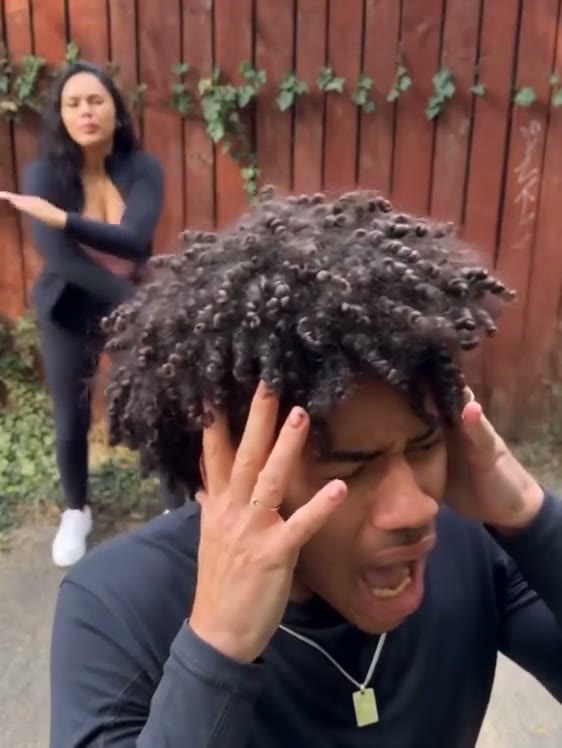
This Smalltown Boy Dance AI reference is the clip the workbench follows. It is not your generated result, and it does not include the song.
What does Smalltown Boy Dance AI keep?
A 3:4 frame
The output stays 3:4 for 15 seconds. Smalltown Boy Dance AI does not crop it to 9:16.
Two labeled dancers
Dancer 1 is required. Smalltown Boy Dance AI maps Dancer 2 to the person in pink.
Photo count picks the model
Wan 2.2 Animate Replace handles one photo. Seedance 2.5 handles the pair so each identity stays attached to one slot.
No track in the download
The clip follows the dance timing. It does not ship the recording.
How do I run Smalltown Boy Dance AI?
- 1. Add the first dancer. Use a photo of one person. Smalltown Boy Dance AI needs the hair and clothing easy to tell apart from the partner.
- 2. Add the second dancer if you want both replaced. Match the second photo to the person who should take the pink-top role.
- 3. Pick 480p or 720p. 720p is the better pass when both faces are small in the portrait frame.
- 4. Watch the partner handoff. Duo shots can swap faces at a cut. Check the whole 15 seconds before you post.
Where does this photo animation fit?
A duo portrait
Two separate photos keep the identities cleaner. Smalltown Boy Dance AI should receive one person in each slot.
A single replacement
Leave dancer 2 empty when Smalltown Boy Dance AI should keep the partner in the reference.
A portrait-ratio post
3:4 fits feeds that are not strictly vertical, without stretching the dance.
How does this compare?
Choose Smalltown Boy Dance AI when the motion should stay on this loaded reference.
| Workflow | What you supply | What stays fixed | Audio |
|---|---|---|---|
| Smalltown Boy Dance AI | The curly-haired dancer is required. The dancer in pink is optional. | The reference loaded on this page | Not included |
| Photo to Video | One photo and a motion description | No reference clip | Depends on the model you pick |
| Replace Character | Your photo and a source video you upload | The motion in your video | Set on Replace Character, not by this fixed reference |
| Wan 2.2 Animate Replace | A character image and a driving video | The driving video you choose | Set on that page, not by this fixed reference |
Which settings should I use?
| Choice | Model | Credits |
|---|---|---|
| One photo · 15s · 3:4 · 480p | Wan 2.2 Animate Replace | 315 |
| One photo · 15s · 3:4 · 720p | Wan 2.2 Animate Replace | 635 |
| Two photos · 15s · 3:4 · 480p | Seedance 2.5 | 1,690 |
| Two photos · 15s · 3:4 · 720p | Seedance 2.5 | 3,755 |
Smalltown Boy Dance AI charges the credit totals in this table.
One photo at 480p uses 315 credits. One photo at 720p uses 635 credits. Two photos at 480p use 1,690 credits. Two photos at 720p use 3,755 credits.
Charged in credits. See the credit table on this page. Two-photo runs bill the reference length plus the new clip. Opening the workbench does not charge credits.
Use a JPG, PNG, or WebP photo up to 10MB.
Animate Photo AI is not the model provider. One photo uses Wan 2.2 Animate Replace. Two photos use Seedance 2.5.
Common questions
Why is the frame 3:4?
That is the reference aspect. Smalltown Boy Dance AI does not reframe the dance to 16:9 or 9:16, and it does not crop the 15-second clip inside this page. Both dancers stay inside that portrait frame. It also does not stretch the dancers.
Which photo is which dancer?
The first slot replaces the curly-haired dancer. Smalltown Boy Dance AI uses the second slot for the dancer in pink.
Does it include the song?
No. Smalltown Boy Dance AI does not put the song in the file. It animates photos onto the dance reference and is not an artist or label product. There is no soundtrack upload, and mouth movement is not timed to a released track.
Can I upload one photo of both people?
Put one person in each slot. A combined photo gives the model two faces in a single input.
Which model runs a duo?
Seedance 2.5. A single photo stays on Wan 2.2 Animate Replace.
Is this an official music tool?
No. It animates photos onto a dance reference. It is not an artist or label product.
Can I use the clip commercially?
You keep the rights to the photos you upload. The User Content section at /terms#user-content says those rights stay with you, and that you grant Animate Photo AI a license only to provide the service. This page does not grant rights to a song, an official video, or another person's likeness.
Related tools
Start with your photo
Run Smalltown Boy Dance AI from the workbench above. Opening it does not charge credits.
Back to the workbench