Source video checklist
Use a 5 to 10 second source clip with one main character, 720p or higher resolution when possible, stable lighting, limited blur, and minimal occlusion from hands, props, or other people.
MODEL
CHARACTER ORIENTATION
Need a first successful run?
REPLACEMENT CHARACTER IMAGE
JPEG, PNG, JPG, WEBP · max 10MB
SOURCE VIDEO
MP4, MOV · max 100MB · 3-30s
PROMPT
Resolution
TOTAL CREDITS
Upload video first
Replace Character demo video
Start a generation to see your latest videos here.
Character Replacement AI Video Generator
Character replacement AI replaces the visible subject in an existing video while keeping the original motion, camera framing, lighting, and scene context. Upload a clear source video and a readable replacement character image to change who appears without rebuilding the entire shot.
Use this workflow when the action already works, but the visible person, avatar, mascot, or stylized character needs to change. The source video controls motion, expressions, lighting, and camera flow while the replacement image defines who should appear in the final result.
Character replacement AI changes the visible subject inside an existing clip while preserving the movement and scene structure of the original video.
| Comparison | What it means |
|---|---|
| Character Replacement AI vs AI Face Swap | AI face swap usually focuses on facial identity. Character replacement is broader: it can replace the visible character, outfit, body presence, mascot identity, or stylized subject while the full scene remains intact. |
| Character Replacement AI vs Full Body Swap | Full body swap is useful when posture, clothing, silhouette, or movement matters. Results are strongest when the source character is visible and the replacement image has a readable face, outfit, and body shape. |
| Character Replacement AI vs Motion Transfer | Use character replacement when you already have a video and want to replace its subject. Use motion transfer when you want to animate a separate image using movement from another reference clip. |
Prepare the right files, choose the right model, generate, and review the result before publishing.
Choose the clip that contains the motion, camera movement, lighting, and scene flow you want to preserve.
Upload the person, avatar, mascot, anime character, or stylized subject you want to insert.
Clarify wardrobe, identity details, background cleanup, lighting consistency, or what parts of the scene must remain unchanged.
Use Kling 2.6 for balanced motion control and Kling 3.0 when identity stability matters most.
Review hands, edges, occlusion, lighting, and identity consistency before publishing or scaling into longer edits.
Kling 2.6 and Kling 3.0 support different replacement goals. Pick the model that matches the quality bar, review stage, and credit budget for the shot.
| Compare | Kling 2.6 | Kling 3.0 |
|---|---|---|
| Key difference | A balanced motion-control option for preserving source movement while keeping credit use lower than Kling 3.0. | The stronger AI character swap choice when identity stability, gesture detail, and motion quality matter most. |
| Best for | Short creator clips, source-video swaps, dialogue concepts, and practical review rounds. | Client-facing edits, close-up character shots, dance or action clips, and final passes where fewer artifacts matter. |
| Cost profile | Medium cost; it uses fewer credits per second than Kling 3.0 at the same resolution. | Highest relative cost; choose it when quality and fewer failed retries are worth the extra credits. |
A practical workflow is to use Kling 2.6 for a credit-conscious motion-control pass, then reserve Kling 3.0 for demanding replacement shots.
Better source files create better outputs. Use this checklist before running a character replacement generation.
Use a 5 to 10 second source clip with one main character, 720p or higher resolution when possible, stable lighting, limited blur, and minimal occlusion from hands, props, or other people.
Use a sharp replacement image with a clear face, visible outfit or design details, front-facing or three-quarter angle, clean lighting, and at least 720 px on the longest side when possible.
Reinforce the edit goal with short guidance for preserved camera angle, background, lighting, wardrobe, and identity cues. Keep the prompt specific to details the files do not already show.
Fast cuts, heavy blur, low-resolution inputs, crowded scenes, mismatched angles, and blocked subjects can make replacement less stable. Split long edits into scene-level clips before stitching.
The workflow is designed for controllable AI video edits. It shows what to upload, which model to choose, and how to improve results when a replacement fails.
The workflow supports broader character swap edits where body shape, outfit, motion, and scene fit matter.
The source clip remains the motion reference, helping the final video keep timing, camera flow, expressions, lighting, and composition.
Use Kling 2.6 for a credit-conscious pass and Kling 3.0 for demanding shots that need stronger identity and motion stability.
Use the workflow for creator remixes, virtual influencers, brand mascots, anime-style characters, and previsualization scenes.
Compare the source video, replacement character, and final output to judge motion preservation and identity consistency.
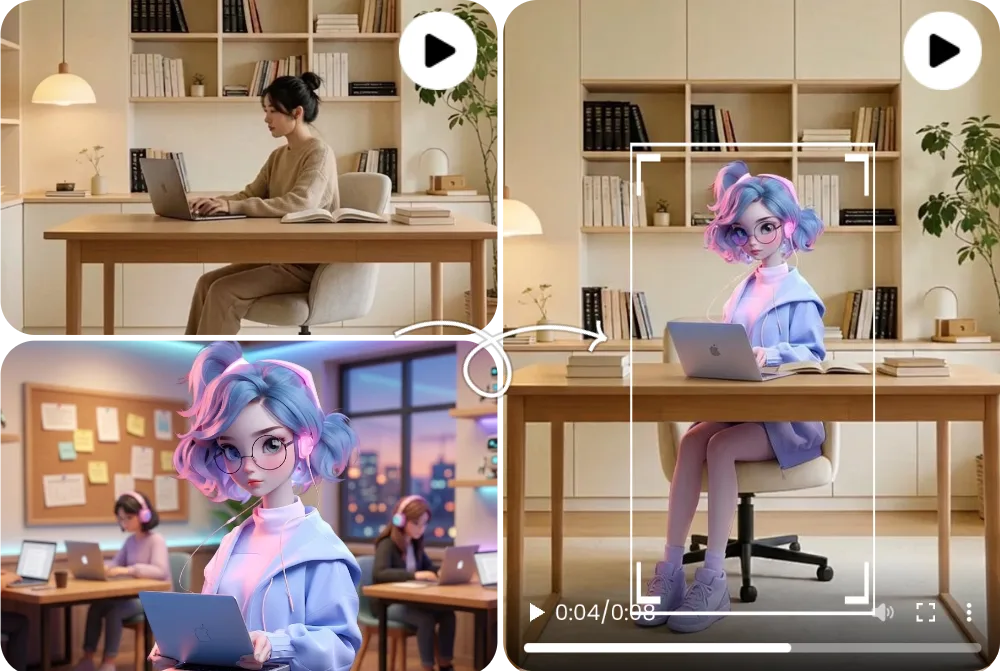
Compare the source clip, replacement character image, and generated output side by side.
See how the output changes more than the face, including body shape, outfit, pose, and silhouette.
A stylized character can enter the scene while preserving camera framing, lighting, and movement rhythm.
Answers to the most important questions before you replace a character in video with AI.
Yes. Character replacement AI swaps the visible person in a source video with your character image while keeping the original motion. It is not the homepage animate photo workflow, which starts from a still image.
Upload a source video, add the replacement character image, write optional prompt guidance, choose a model, and generate the result. Animate Photo AI uses the source clip to preserve motion, expressions, lighting, and camera flow while replacing the visible character.
No. Face swap usually changes facial identity only. Character replacement AI can support broader video character replacement, including body presence, outfit, mascot identity, stylized characters, and full-scene continuity.
Yes, when the inputs are clear. Full-body replacement works best when the source subject is visible, not heavily blocked, and the replacement character image has a clear silhouette, outfit, and visual identity.
Use a short clip with one main character, stable lighting, clear body shape, and limited motion blur. Avoid crowded scenes, fast cuts, heavy occlusion, and low-resolution footage for the first test.
Flicker usually comes from inconsistent lighting, fast movement, occlusion, low-resolution inputs, or a replacement image that does not match the source angle. Try a shorter clip, cleaner lighting, and a sharper character image.
Yes. The workflow supports realistic people, avatars, mascots, anime-style characters, and stylized artwork. The key is visual clarity: the character image should have a recognizable identity and enough detail to survive motion.
You need permission to use the source video, replacement character, likeness, and any brand assets involved. For commercial use, review local rules, platform policies, and your plan terms before publishing.
For first tests, no. Short clips are easier to inspect and refine. If you need a longer edit, split it into scenes with similar lighting and camera framing, keep the same replacement image across clips, and review each segment before stitching the final video.
Use Character Replacement AI when you already have a source video and want to replace the visible character inside that clip. Use Motion Transfer when you want to animate a new character or image from a separate movement reference.
Explore adjacent workflows without losing the same reference-led video creation path.
Read the Wan 2.2 Animate two-input workflow and mode decision guide before you run a swap.
ExploreAnimate a separate character image from a reference motion clip when you do not need to keep the original scene.
ExploreCompare credits and plans before scaling from short character replacement tests to publish-ready output.
ExploreGo to the homepage to animate a photo into a short video when you do not have a source clip to swap into.
ExploreCreate the edit
Ready to replace a character without reshooting the scene? Upload a source clip, add your replacement character, and generate a controlled character replacement video.
Generate a character replacement