Lobby clip from a portrait or a pet
Hotel Lobby AI photo animation
Hotel Lobby AI follows a fixed 10-second, 16:9 lobby clip. The singer photo is required and uses Wan 2.2 Animate Replace. A second photo can replace the golden retriever with a person or a pet through Seedance 2.5. The download does not include the song.
What does Hotel Lobby AI do?
Last updated
Hotel Lobby AI follows a 10-second, 16:9 lobby reference. The man in the black suit is the required photo.
Hotel Lobby AI replaces the golden retriever from the partner slot. That second photo can be a person or an animal.
One photo uses Wan 2.2 Animate Replace. Two photos use Seedance 2.5. The song is not included.
Why follow this reference?
The lobby clip is a wide, quiet performance rather than a fast dance. Hotel Lobby AI keeps the room and timing while changing who is in it.
The first photo replaces the singer. If you stop there, the dog stays in the reference and Wan 2.2 Animate Replace runs the photo.
A second photo replaces the dog with whatever that photo shows. Hotel Lobby AI treats a person as the partner and a pet photo as the animal beside the singer.
Motion reference
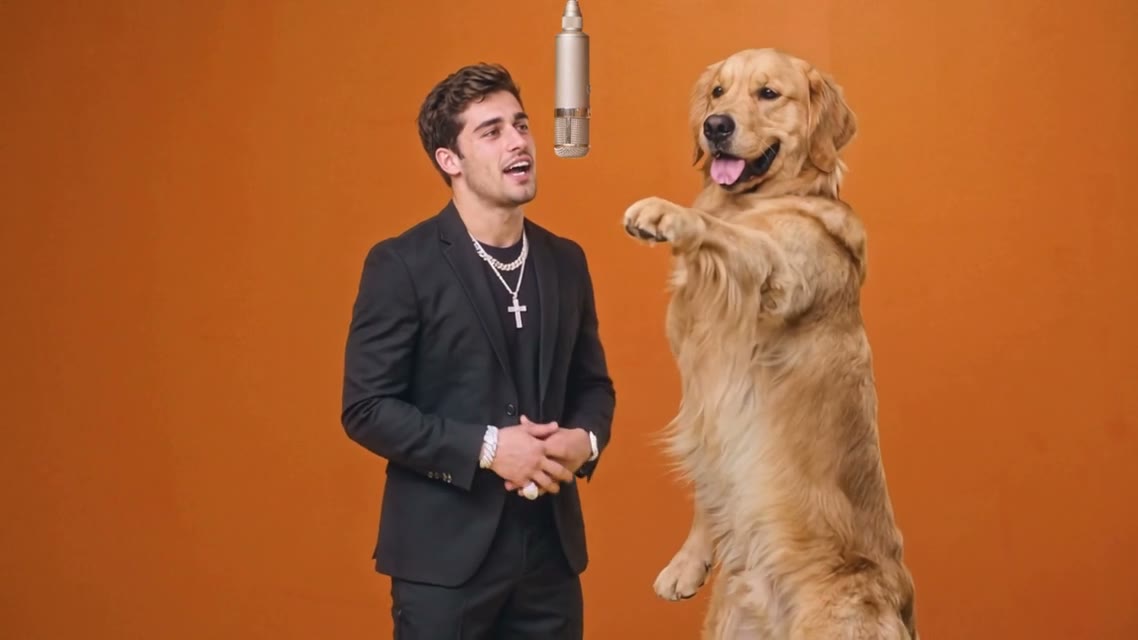
This Hotel Lobby AI reference is the clip the workbench follows. It is not your generated result, and it does not include the song.
What does Hotel Lobby AI keep?
The singer is required
Use one clear photo of the person who should wear the black-suit role. Hotel Lobby AI needs the face readable at lobby distance.
The partner can be a pet
The second slot is optional and replaces the retriever. A dog, cat, or person photo is used as that whole subject, not as a sticker.
Ten widescreen seconds
The output remains 10 seconds at 16:9. Choose 480p for a draft or 720p for a cleaner suit and face.
No performance track
Mouth movement follows the reference motion. Hotel Lobby AI has no audio upload on this page.
How do I run Hotel Lobby AI?
- 1. Upload the singer. One adult, face visible. Hotel Lobby AI does better without a crowd behind them.
- 2. Upload a partner or pet if you want the dog replaced. Use a single subject. A person photo and a pet photo are both valid in this slot.
- 3. Choose 480p or 720p. The credit line updates with the resolution and with whether you added the second photo.
- 4. Review the lobby edges. Check the suit, the floor line, and the partner’s paws or hands before you export.
Where does this photo animation fit?
A portrait in a formal room
One singer photo is enough when Hotel Lobby AI should leave the dog in the reference.
A person and their pet
Use the second slot for the animal Hotel Lobby AI should place beside the singer.
Two people
A second portrait replaces the dog with that person rather than adding a third figure.
How does this compare?
Choose Hotel Lobby AI when the motion should stay on this loaded reference.
| Workflow | What you supply | What stays fixed | Audio |
|---|---|---|---|
| Hotel Lobby AI | The singer photo is required. A second photo can replace the dog with a person or a pet. | The reference loaded on this page | Not included |
| Photo to Video | One photo and a motion description | No reference clip | Depends on the model you pick |
| Replace Character | Your photo and a source video you upload | The motion in your video | Set on Replace Character, not by this fixed reference |
| Wan 2.2 Animate Replace | A character image and a driving video | The driving video you choose | Set on that page, not by this fixed reference |
Which settings should I use?
| Choice | Model | Credits |
|---|---|---|
| One photo · 10s · 16:9 · 480p | Wan 2.2 Animate Replace | 215 |
| One photo · 10s · 16:9 · 720p | Wan 2.2 Animate Replace | 430 |
| Two photos · 10s · 16:9 · 480p | Seedance 2.5 | 1,135 |
| Two photos · 10s · 16:9 · 720p | Seedance 2.5 | 2,510 |
Hotel Lobby AI charges the credit totals in this table.
One photo at 480p uses 215 credits. One photo at 720p uses 430 credits. Two photos at 480p use 1,135 credits. Two photos at 720p use 2,510 credits.
Charged in credits. See the credit table on this page. Two-photo runs bill the reference length plus the new clip. Opening the workbench does not charge credits.
Use a JPG, PNG, or WebP photo up to 10MB.
Animate Photo AI is not the model provider. One photo uses Wan 2.2 Animate Replace. Two photos use Seedance 2.5.
Common questions
Can the second photo be a pet?
Yes. Hotel Lobby AI uses the partner slot to replace the golden retriever with the subject of the second photo. That subject can be a person or an animal, and it is not pasted on as a sticker. One singer photo leaves the dog in the loaded reference.
What if I only upload the singer?
Wan 2.2 Animate Replace changes the singer. Hotel Lobby AI leaves the rest of the lobby reference in place.
Does the download include the song?
No. Hotel Lobby AI has no audio upload, and the download does not include a released track. Mouth movement follows the reference motion and is not synced to lyrics. The lobby timing stays with the loaded ten-second clip. There is no lyric sheet on this page.
Why does a second photo cost more?
Two photos switch to Seedance 2.5, which bills the reference length plus the new clip.
Can I change the lobby?
No. The room, camera, and timing come from the loaded reference.
Is the lip movement exact lyrics?
No. The mouth follows the reference motion. It is not synced to a song file.
Can I use the clip commercially?
You keep the rights to the photos you upload. The User Content section at /terms#user-content says those rights stay with you, and that you grant Animate Photo AI a license only to provide the service. This page does not grant rights to a song, an official video, or another person's likeness.
Related tools
Start with your photo
Run Hotel Lobby AI from the workbench above. Opening it does not charge credits.
Back to the workbench